
Game guide
Everything you need to explore Perihel — flying, jumping, surveying, mining, trading, claiming and staying oriented. Use the contents to jump to any topic. If you would rather be walked through it in order, the tutorial covers the same ground as a sequence.
Introduction
Perihel is a browser space-sim. You fly a ship with six degrees of freedom through a hybrid Milky Way — roughly 110,000 real stars from the HYG catalogue, plus about 29 million procedurally generated systems filling the space between them — hyperspace-jump between systems, land on planets, mine them, and claim worlds as NFT deeds on Solana.
Nothing to install and nothing to download. It runs in the browser, and you can start without a wallet.
What is free, and what is not
The split is not arbitrary. Everything in the first list happens entirely in your browser. Everything in the second writes a result the rest of the galaxy can see, so the game has to know whose result it is.
- Free, no wallet — flight, supercruise, hyperspace jumps, the star map, the system map and the catalog of claimed worlds.
- Needs a wallet — surveying, landing, mining, selling, the marketplace, the hangar, claiming, comms and appearing to other players.
Account & identity
Your Solana wallet is your account. There is no email, no password and no separate signup. Connecting asks for one signature, which is a sign-in message — it moves no funds and costs no gas.
How long you stay signed in
- A refresh, a browser restart or a server deploy will not sign you out.
- Playing at all pushes the window out again, so an active player is never asked to sign twice.
- About 30 days away and you sign in again. 90 days is a hard ceiling regardless of activity.
Stay safe
Perihel only ever asks your wallet to sign a login message, or to approve a claim you started yourself. Nothing else. No part of the game will ever ask for your seed phrase — anything that does is not us.
Playing as a guest
Choose PLAY AS GUEST at the entry screen and you skip the wallet entirely. Guest surfaces that would not work are hidden rather than shown as buttons that fail, so the HUD you get is one where everything on it does something. Connect a wallet at any time from the top bar.
Your first session
You start at Barnard’s Star, six light years from Sol, in the console: the autopilot flies the ship, and G takes manual control. Settings lists every key and holds “Switch to the classic HUD”. The classic HUD starts you in Sol instead: its flight controls are live from the start, and an in-game coach walks you through the first few steps one at a time; this is the same ground, written out.
Recommended first steps
- Press G to take manual control (on the classic HUD, click the view to take the stick), then fly. Nothing you do here can go wrong.
- Set some throttle and engage supercruise with SPACE — cross the system and look at a planet up close.
- Open the system map with N to see what is around you, and the star map with TAB to see where you could go.
- Pick a star inside jump range and press J. That is the whole loop of getting somewhere.
- When you want to survey, mine or claim, connect a wallet — those are the parts that need one.
What to avoid early
- Do not go looking for a rare world on your first jump. Rarity is steeply weighted and most systems are ordinary; the interesting ones are found by covering ground.
- Do not fill your hold with stone. Cargo space is finite and the cheap resources fill it fastest.
- Do not treat a claim as an investment. A deed mints for real and is genuinely yours, but what it is worth is only what another player will pay — see Owning things safely.
Flight & controls
The ship has six degrees of freedom: it pitches, yaws and rolls as well as translating on three axes. There is no up in space and the flight model does not invent one.
Steering
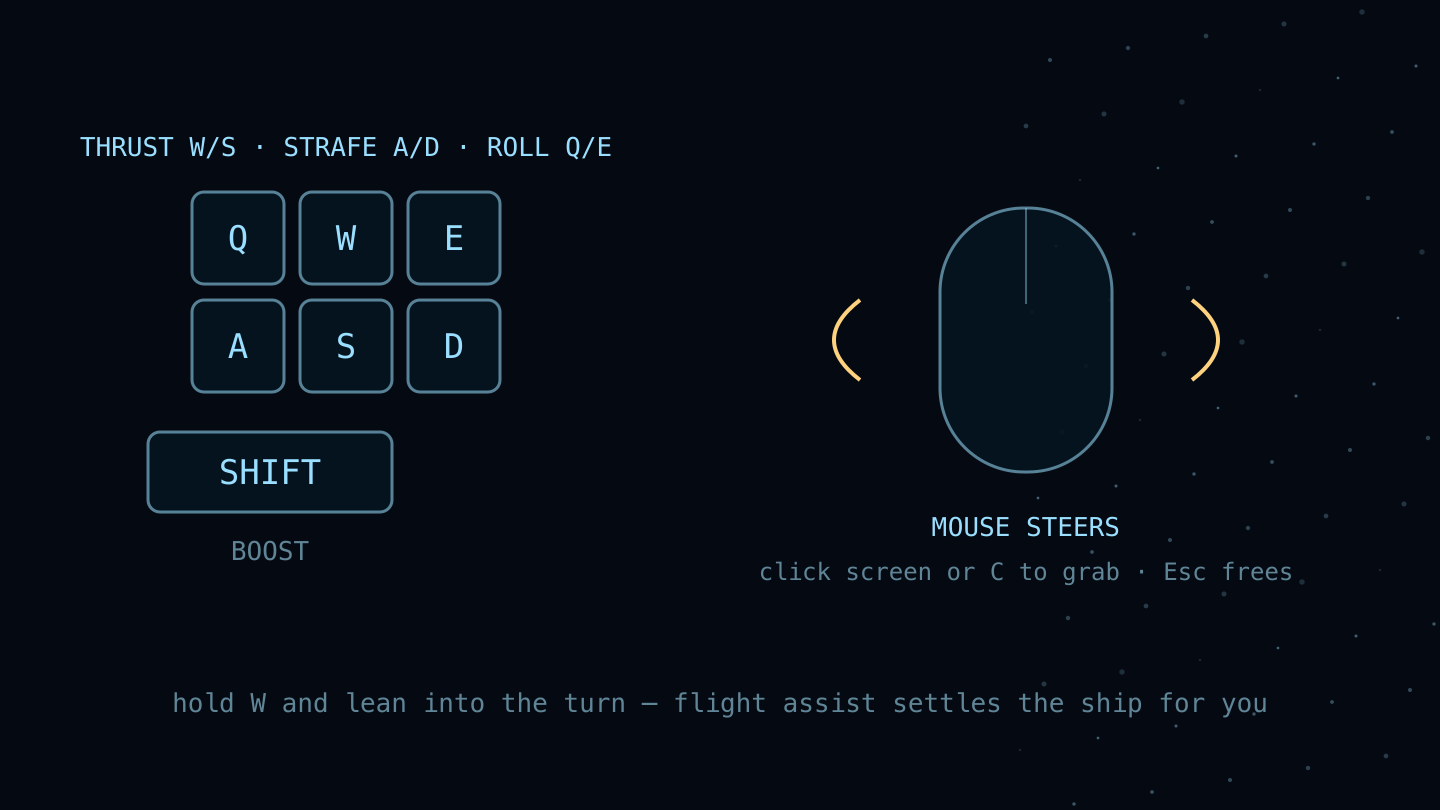
- Click the view or press C to take the stick. Move the steering cursor away from center to turn toward it; farther out turns faster. Bring it back to the center ring to fly straight.
- C — toggle between mouse flight and a free cursor, for when you want to click panels instead of steer.
- Hold the right mouse button to look around. Release it to resume with centered steering.
- Throttle is a dial, not a pedal: set it and the ship holds that speed.
Moving the ship
| KEY | DOES |
|---|---|
| W / S | Thrust forward and back |
| A / D | Strafe left and right |
| Q / E | Roll |
| SHIFT | Boost |
| MOUSE | Steer — the ship turns toward the pointer |
Reading the HUD
- Bottom-left — speed, throttle percentage and what the drive is doing (NORMAL, CHARGING, SUPERCRUISE).
- Top bar — the system you are in, whether it is claimed, and how many other explorers are here.
- Bottom centre — every key that currently does something. Bindings that would not work are filtered out rather than shown dead.
Supercruise
SPACE engages the fast in-system drive. Normal thrust is for manoeuvring around something; supercruise is for the distance between planets, which at normal thrust would take hours.
Dropping out
Approaching a large body drops you out automatically, with a proximity alert. That is the drive working, not failing — it is what stops you crossing an entire system and arriving inside a planet. Expect it every time you approach something you were aiming at.
Hyperspace jumps
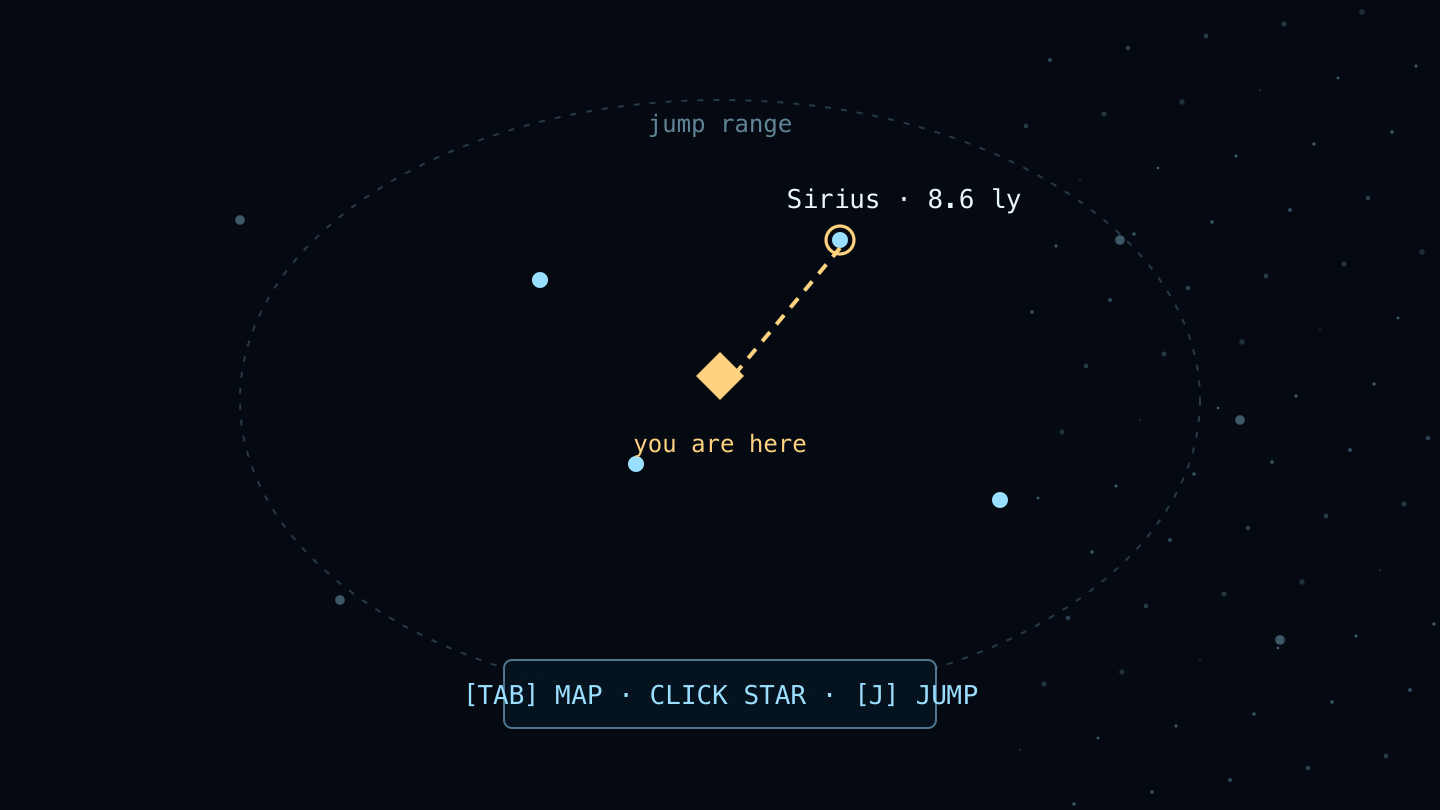
J jumps to another star system. You need a destination selected first, and it has to be inside jump range — 15 light years by default.
How to jump
- Open the star map with TAB.
- Pick a destination from the in-range list — stars beyond range cannot be selected.
- Press J. The drive charges, then fires.
- Everything you are carrying comes with you.
Getting further
Long crossings are made of many jumps, not one big one. Chains of in-range stars are how you cover distance, which is why the star map lists what is reachable rather than what is nearby.
Star map & system map
Star map (TAB)
The galaxy. This is where you choose where to go. Real catalogue stars carry their real names — Proxima Centauri, Barnard’s Star, Wolf 359 — because they are real stars; the procedural ones fill in around them.
System map (N)
The system you are in, up close: every body, how far away it is, and who owns it. Bodies nobody has scanned read as UNKNOWN WORLD, which is an invitation rather than an error.
Systems, bodies & archetypes
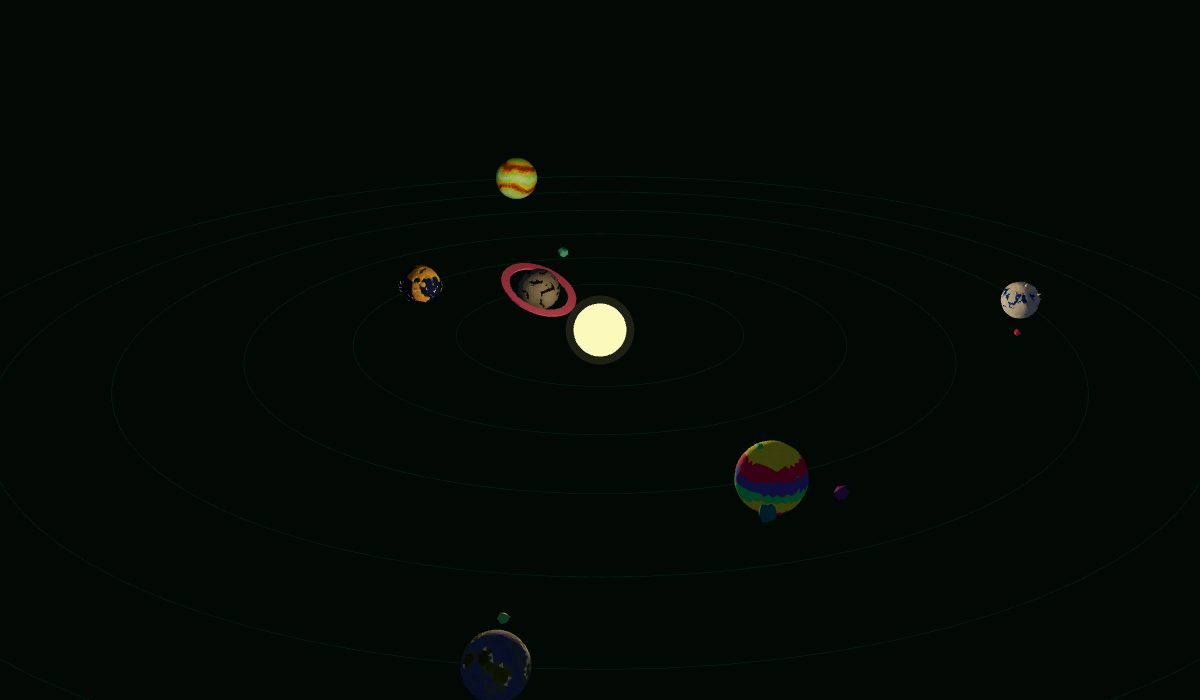
A system is a star and the bodies around it. A body is anything you can select — a planet, a moon, or the star itself. Bodies are what get surveyed, landed on, mined and claimed.
Archetypes
The archetype is what kind of world it is — rocky, terra, oceanic, lava, toxic, ice, crystal, forge, marble and others. It decides the terrain, the palette and what grows there, and it is the same world whether you are looking from orbit or standing on it. What you see from space is what you land on.
Protected bodies
Stars, and landmark worlds such as Luna, are protected: they can be visited and in some cases landed on and walked, but they cannot be claimed. They are not for sale.
Rarity tiers
Every world has one of five rarity tiers. They are steeply weighted — this is the single most useful table in the guide, because it is what makes a find a find.
| TIER | ROUGHLY HOW OFTEN |
|---|---|
| Common | 70 in 100 |
| Uncommon | 22 in 100 |
| Rare | 5 in 100 |
| Ultrarare | 2 in 100 |
| Exotic | 1 in 100 |
What rarity changes
- The look — exotics carry a glowing ring or debris belt, which is visible from orbit before you scan anything.
- What is claimable — better worlds are gated behind a higher lander rank.
- What it is worth — a deed is only as interesting as the world it names.
Surveying & scanning
V sweeps the system and surveys whatever is in your sights. Surveying is what turns an UNKNOWN WORLD into a named world with a known archetype and rarity, and it is the first thing in the game that needs a wallet — the result is recorded against you.
As a guest
The scan control stays visible and explains that it needs a wallet, rather than silently doing nothing. That is deliberate: a control that looks alive and is not is worse than one that tells you why.
Landing
Approach a landable world and land. You drop into its surface — a top-down view built from that specific world’s own recipe, so the terrain, the water and the colours are the ones you saw from orbit rather than a generic planet.
On foot
Some worlds — Luna and the voxel worlds — let you leave the ship and walk in third person. The moonbase concourse on Luna is a built environment you can walk into, and on voxel worlds you can mine on foot with a blaster rather than from the ship.
Mining & resources
R mines. Deposits sit on the surface as nodes; each node holds one resource, and mining it depletes it permanently. Nodes do not grow back, so a worked-over landing site stays worked over.
The thirteen MINED resources, by family
| FAMILY | RESOURCES |
|---|---|
| Metallic | iron, nickel, cobalt, magnesium |
| Precious | silver, gold, platinum |
| Radioactive | uranium |
| Crystalline | silicon, crystal |
| Ice | ice |
| Volatile | gas |
| Inert | stone |
Each family has its own baked silhouette, so you can tell what a node is from its shape before you are close enough to read a label.
A Fabricator Core is the one resource no node holds. It is stripped from a robot fabricator you destroy on an infested landing — one core per fabricator, and a felled fabricator stands again about a day later — and it is the catalyst every A-tier module upgrade needs. It stacks like any metal and is kept for crafting: it cannot be traded between pilots, and the Exchange does not list or sell Fabricator Cores. On a claimed world the core goes to the world’s owner alone: a visitor can still bring the fabricator down, but is paid nothing for it.
Cargo & capacity
Your hold has a fixed number of slots, and each slot holds one resource up to a cap that depends on its family. The scarcer the family, the smaller the stack.
| AMOUNT | |
|---|---|
| Slots at the start | 24 |
| Slots at maximum | 48 |
| Slots per expansion pack | 4 |
| Stack cap — metallic, inert | 999 |
| Stack cap — crystalline, ice, volatile | 500 |
| Stack cap — precious, radioactive | 250 |
Tips
- Travel light into somewhere new — you cannot pick up what you have no room for.
- Stone fills slots fastest and is worth least. It is the first thing to leave behind.
- Bank value, not volume: a quarter-stack of platinum beats a full stack of rock.
Scrip & the vendor
Scrip is the in-game currency. The vendor is the standing buyer for mined resources: it quotes a price, you sell, you get scrip. Scrip is held server-side and is entirely separate from anything on-chain — it is game money, not a token.
Why the price moves
Together these mean mining is worth doing and cannot be farmed flat in an afternoon.
- Quotes expire, so a price you were shown is not a price you hold indefinitely.
- There is a daily cap on how much new scrip the vendor will mint.
- There is a floor under the price, so the market cannot be driven to nothing.
Marketplace
The marketplace is a station service — land at a station and walk to its counter. It is player-to-player trading in resources and modules, priced in scrip.
Listings are escrowed
What you list leaves your hold the moment you list it, and comes back only if you cancel. That is what makes a listing trustworthy — nothing on the board can be sold out from under a buyer because the seller spent it elsewhere first.
Ship modules & the hangar
The hangar is the station shipyard — dock and walk to it. Modules go on the ship there. Modules carry a rank, and rank maps one-to-one onto the five world rarity tiers.
| RANK | EQUIVALENT TIER |
|---|---|
| C | Common |
| B | Uncommon |
| A | Rare |
| S | Ultrarare |
| X | Exotic |
Your lander rank is what gates which worlds you may claim, so fitting better modules is the path to the worlds worth claiming.
Claims & deeds
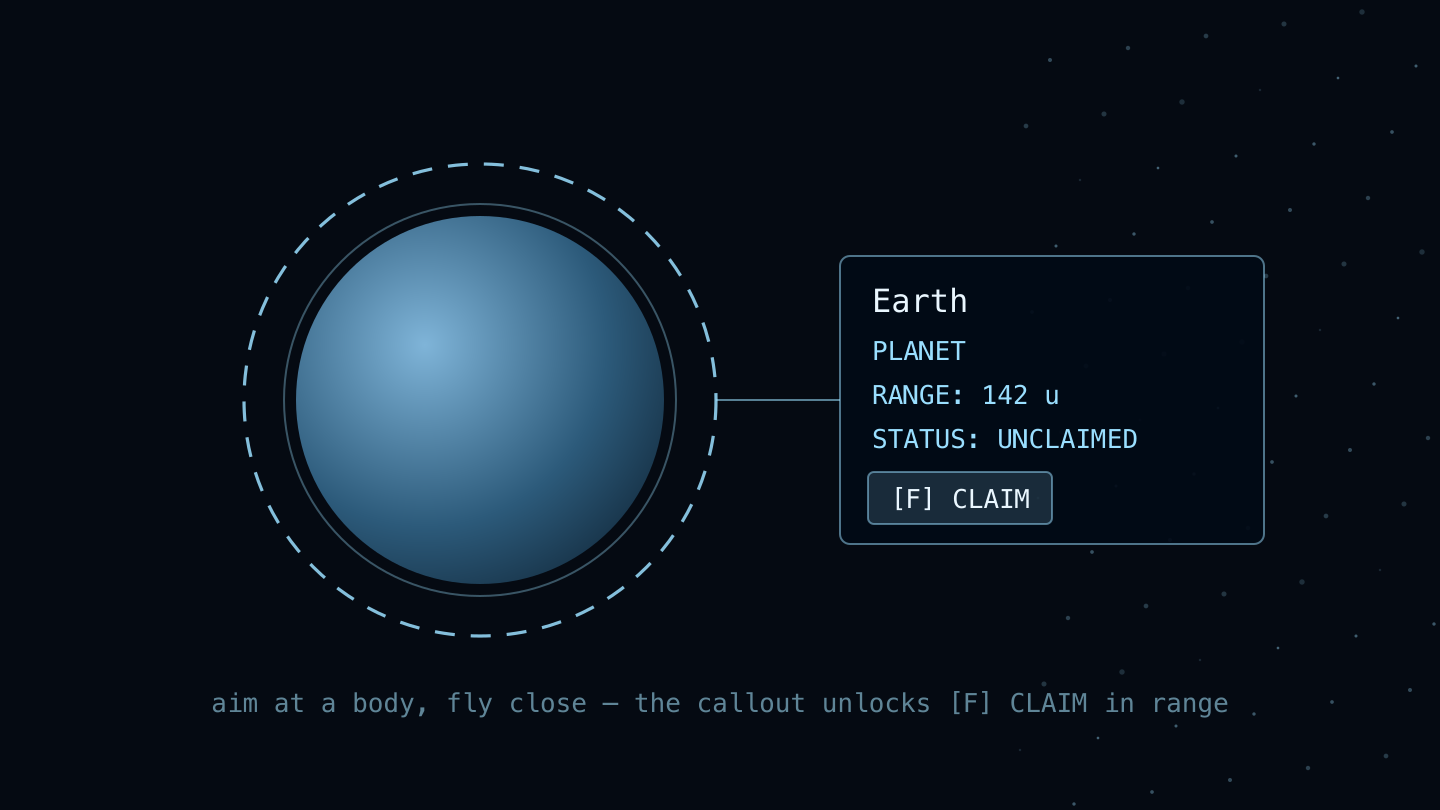
Claiming a body mints its deed to your wallet as a Metaplex Core NFT, with generated art of that specific world. This is the one action in the game that is a real transaction and asks your wallet to approve it.
What can be claimed
- The world has to be surveyed, and unclaimed.
- It must not be protected — stars and landmarks like Luna never are claimable.
- Better rarity tiers require a higher lander rank.
- Claim budgets and release windows can hold some worlds back at any given moment.
Deed art is permanent
Once a deed is minted its art is never regenerated. What you hold is what you saw when you claimed it, and no later change to the generator alters an existing deed.
The catalog
The station registry indexes claimed worlds, browsable by rarity — yours and everyone else’s. It needs no wallet, so guests can read it, and it is the quickest way to see what has already been taken.
Owning things safely
A claim mints for real. The deed is a Metaplex Core NFT that lands in your wallet and stays there — it is yours to hold or to sell, and it outlives your interest in the game.
What a deed is worth is only what another player will pay for it. Perihel promises nothing about that, and anyone guaranteeing you a return is running a scam. Claim and trade from perihel.xyz and nowhere else, and read what your wallet puts in front of you before you approve it.
Explorers & presence
The top bar counts the other explorers in your current system. Everyone in a system shares one room, so that count is who is actually there with you, not who is online globally.
Spectators
A system admits a bounded number of broadcasting ships. Arrive at a full one and you join as a spectator: you see everyone, they do not see you, and you are promoted to a normal slot as soon as one frees. Slots free when players jump away or go idle.
Ghost mode
Ghost mode hides you from other players while leaving them visible to you. It is a multiplayer setting, so it needs a signed-in wallet — for a guest it would toggle nothing, and it is hidden rather than shown.
Comms
ENTER opens comms — system chat with the explorers around you. Voice is separate: a self-hosted voice room, gated to holders.
Controls reference
Every binding in flight. H opens this same list in-game at any time — if you remember one key, make it that one. Bindings that need a wallet are marked.
| KEY | DOES |
|---|---|
| SPACE | Supercruise — the fast in-system drive |
| C | Mouse flight on / off |
| V | Scan and survey what is in your sights (wallet) |
| J | Hyperspace jump to the selected star |
| R | Mine the node in range (wallet) |
| TAB | Star map — choose a destination |
| N | System map — the bodies around you |
| I | Inventory — your cargo hold, anywhere |
| U | Pilot profile — your callsign, Explorer rank and referral code, anywhere |
| L | Catalog — the worlds you have discovered or claimed, and your fish tank |
| ENTER | Comms — system chat (wallet) |
| O | Photo mode |
| M | Sound on / off |
| P | Ghost mode (wallet) |
| H | The full controls deck |
On a phone
Flight is landscape-only; portrait shows a rotate prompt, and if your browser refuses to rotate (some in-app wallet browsers do) the same prompt can turn the view instead. The keyboard dock becomes SYSTEM and CREW drawers, and there is a one-thumb steering stick.
Idling & sessions
Five minutes without input pauses the game back to the menu, with a warning first that any input cancels. Resuming costs no signature — a short pause does not touch your session.
Why it exists
- It releases the GPU, so an idle tab stops working your machine.
- It frees your multiplayer slot for someone actually flying.
- Wallet players resume in the same system; guests, who have no saved position, resume at the start star.
Glossary
Every term the game uses, defined once.
Flight
- 6DOF
- Six degrees of freedom — the ship pitches, yaws and rolls as well as moving along three axes. There is no “up” in space and the flight model does not pretend otherwise.
- Throttle
- How much of the drive you are asking for, shown as a percentage in the flight readout. It is a setting, not a key you hold — the ship holds the speed you dial in.
- Supercruise
- The fast in-system drive, on SPACE. Crossing a system at normal thrust would take hours; supercruise makes the distance between planets a short trip. It drops you out automatically when you get close to something big — that is the proximity alert, not a failure.
- Hyperspace jump
- Travel between star systems, on J. Pick a destination in the star map first; only stars inside your jump range can be selected. The jump charges, then fires.
- Star map
- The galaxy view, on TAB. This is where you choose a jump destination. Stars in range are listed and selectable; everything else is scenery until you can reach it.
- System map
- The current system up close, on N — every body in it, how far away it is, and who owns it.
- Ghost mode
- Fly without appearing to other players. You still see them; they do not see you. Requires a signed-in wallet, because it is a multiplayer setting.
Worlds
- System
- A star and the bodies around it. Perihel’s galaxy is hybrid: about 110,000 real stars from the HYG catalogue, plus roughly 29 million procedurally generated systems filling the space between them. The real ones carry their real names.
- Body
- Anything you can select in a system — a planet, a moon, or the star itself. Bodies are what get surveyed, landed on, mined and claimed.
- Archetype
- What kind of world it is — rocky, terra, oceanic, lava, toxic, ice, crystal, forge, marble and so on. The archetype decides the terrain, the palette and what grows there, and it is the same whether you are looking from orbit or standing on the ground.
- Rarity tier
- How unusual a world is, in five steps: common, uncommon, rare, ultrarare, exotic. They are not evenly spread — most worlds are common and exotics are about one in a hundred. Rarity drives the look (exotics carry a glowing ring or belt) and gates which worlds you are allowed to claim.
- Unsurveyed
- A body nobody has scanned yet. Its entry in the system list shows UNKNOWN WORLD until someone surveys it — surveying is what reveals the name and the details.
- Protected
- A body that cannot be claimed — stars and certain landmark worlds such as Luna. They are still landable and minable where the game supports it; they are simply not for sale.
Mining
- Scan / survey
- On V — sweeps the system and surveys the body in your sights. Surveying is what turns an UNKNOWN WORLD into a named one with known contents. It needs a signed-in wallet.
- Mine node
- A deposit on a planet surface. Each node holds one resource and is depleted by mining it — nodes do not refill, so a worked-over landing site stays worked over.
- Resource
- What your hold carries. Thirteen come out of nodes: iron, nickel, cobalt, magnesium, silver, gold, platinum, uranium, silicon, crystal, ice, gas and stone. The fourteenth, a Fabricator Core stripped from a destroyed robot fabricator, is never mined — it is the catalyst an A-tier module upgrade needs.
- Family
- Resources are grouped into seven silhouette families — metallic, precious, radioactive, crystalline, ice, volatile and inert — so you can tell what a node is from its shape before you are in range.
- Cargo
- What your ship is carrying. Capacity is finite, so a full hold is a decision about what to keep and what to sell.
Ownership
- Claim
- Taking ownership of a body. Claiming mints its deed on Solana. Claims are gated — the world has to be claimable, and better worlds require a higher lander rank.
- Deed
- The NFT that proves a claim — a Metaplex Core asset with generated art of the world it names. Deed art is permanent: once minted it is never re-rendered, so what you hold is what you saw.
- Catalog
- On L — the index of claimed worlds, browsable by rarity. It needs no wallet; guests can read it.
Economy
- Scrip
- The in-game currency you get for selling resources to the vendor. It is game money, held server-side, and separate from anything on-chain.
- Vendor
- The standing buyer for mined resources. It quotes a price, the quote expires, and there is a daily cap on how much new scrip it will mint — so mining is worth doing but cannot be farmed flat.
- Marketplace
- On T — player-to-player trading in resources and modules (except Fabricator Cores, which cannot be traded between pilots). Listings are escrowed: what you list leaves your hold until it sells or you cancel.
- Module
- Ship equipment, fitted in the hangar on G. Modules carry a rank — C, B, A, S, X, worst to best — which lines up one-to-one with the five world rarity tiers.
- Hangar
- On G — where you fit modules to your ship and see what you are carrying.
Multiplayer
- Explorers
- Other players in your current system, shown in the top bar. Everyone in a system shares one room; the count is who is actually there with you.
- Comms
- On ENTER — system chat with the other explorers in your system. Voice comms are a separate, holder-gated room.
- Spectator
- A busy system admits a limited number of broadcasting ships. Arrive after it is full and you join as a spectator — you see everyone, they do not see you, and you take a normal slot as soon as one frees.
- Guest
- Playing without connecting a wallet. Guests fly, supercruise, jump, scan and read both maps and the catalog. Anything that needs an identity — claiming, mining, the market, the hangar, comms — is hidden rather than shown broken. Connect a wallet at any time to pick them up.